Monday, February 10, 2020

Decode URL with confidence

Yesterday, while configuring a Unified Service Desk to automatically display a dashboard, I need to obtain the Dashboard GUID.
The first option was to ‘manually’ analyze the values in the Query String.
But this option is prone to error. Developers may copy less or more than the GUID because of the URL encoding.
To minimize this risk, I found this online tool, https://www.urldecoder.org/

What is URL Decoder

It decodes the encoded URL. It makes it easier for us to view the information.

How does it work?

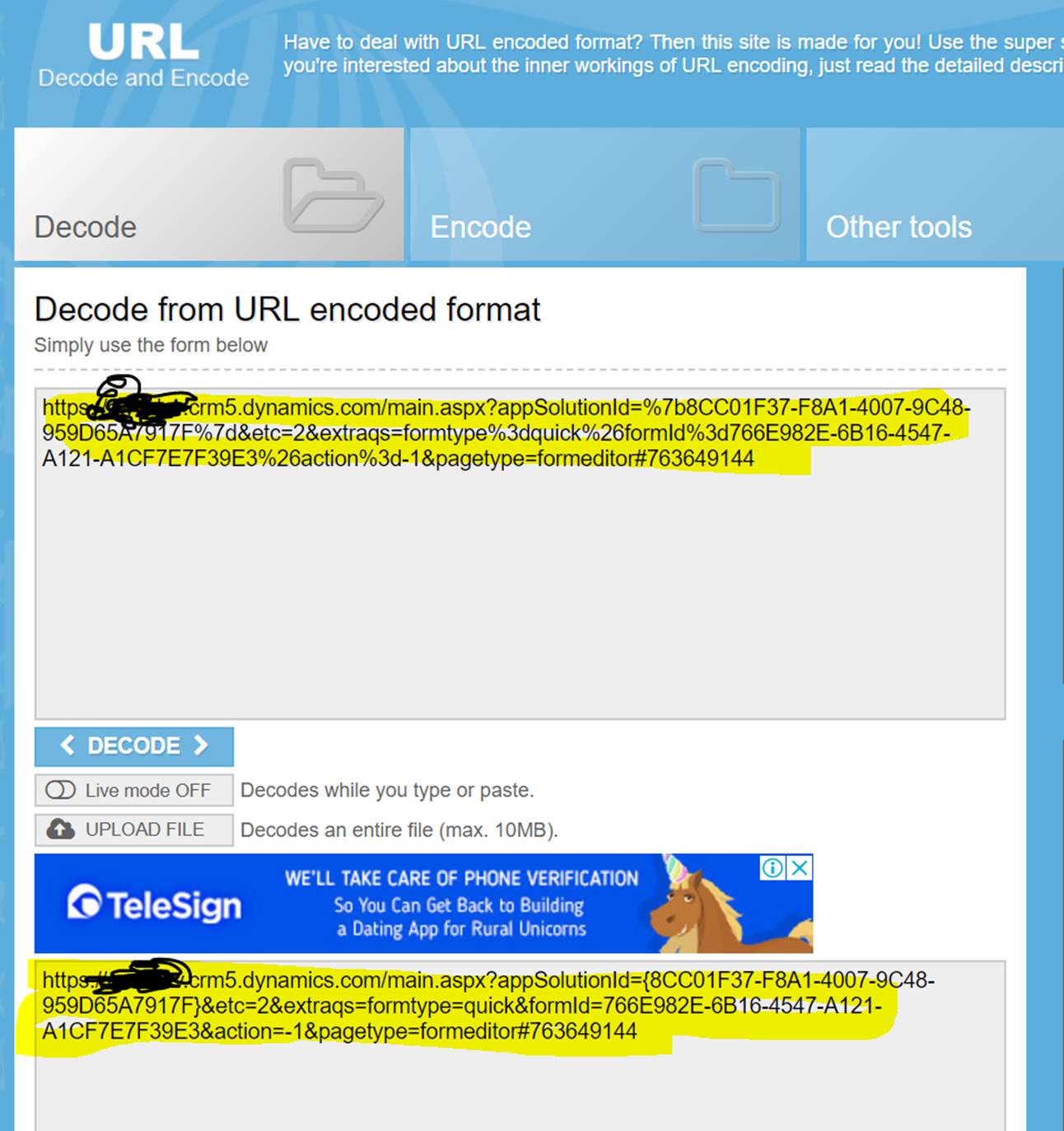
Just paste the encoded URL (Query String) in the upper box and click Decode.
The decoded result will be shown in the lower box.
From here, I can easily copy (and ensure what I’m copying) is correct.

Monday, September 9, 2019

PowerApps: Pagination

Background

I am totally new to PowerApps and found-out that there is no, out-of-the-box (OOB) pagination feature in Datatable or Gallery Control.
I’ve seen a few how-to blogs which walk me through on how to implement it. Refer below for the list.
But it does not really explain the logic on how it was constructed.

Thus, this particular blog is all about. We will break-down the functions used and explain the logic behind it.

What is Pagination?

In layman’s term, it is a process of displaying a chunk/small of results, from a bigger set of results, and PowerApps has no OOB feature of this.
To create a custom pagination in PowerApps, we will use the following PowerApps functions.
  • FirstN – used to display the first set of data, N denotes the number of records to be returned per set.
  • LastN  – used to display the last set of data, N denotes the number of records to be returned per set.


Both of these functions will return collection which will be used to display records in the datatable or gallery control.

The Logic

FirstN will return a big set of records starting from the 1st record, and LastN will trim the records that we are not interested.
It’s confusing isn’t? It is easier if there is an illustration.
In the following case scenario, we will display (page), 2 records at a time.
Let’s start with Page 1 – FirstN will return records 1 & 2 and LastN will return 1 & 2.
Page 2 – FirstN will return 4 records (1-4) but LastN will only return records 3 &4. (Did you now get the picture?)
One more, Page 3 – FirstN will return 6 records, but LastN will only return records 5 & 6.

The Code

The code below is used in Gallery or DataTable Items’ property, where it defines what records will be loaded in that control.
LastN(
    FirstN(varRecords, varIncrementalPageItems),
    varPagingItems
)
Let’s discuss the variables used in the code below and associate them in The Logic above.
<![if !supportLists]>·       <![endif]>varRecords – is a collection, which holds all our data from a datasource. This is the datatable records 1-6 in the table above.
<![if !supportLists]>·       <![endif]>varIncrementalPageItems – is a counter for FirstN return. This will determine the total number of records, starting from the 1st record. This is indicated by 1st
<![if !supportLists]>·       <![endif]>varPagingItems – This defines the number of record to be displayed, per page.

Previous and Next Button Logic

Pagination is incomplete if there is no Previous or Next button.
In PowerApps, majority is event driven. Changes in variable values will take effect to the controls (or code) that is using that variables.
Thus, the Previous and Next button should update varIncrementalPageItems,

Next Button Code

UpdateContext({varCurrentPage:If(varCurrentPage > 0, varCurrentPage + 1, 0)});
UpdateContext({varIncrementalPageItems: varPagingItems * varCurrentPage});

varCurrentPage – is the current page number. The next and previous button must increment and decrement it, respectively.
varIncrementalPageItems as define above, is a result by multiplying current varCurrenPage (Page Number) and varPagingItems.

Previous Button Code

UpdateContext({varCurrentPage:If(varCurrentPage > 0, varCurrentPage - 1, 0)});
UpdateContext({varIncrementalPageItems: varPagingItems * varCurrentPage});
 ******************************************************************************************

Friday, April 7, 2017

MSDYN Diary: Workflow updating the Status Reason field

One of my design was executed today.
However, we discovered a limitation and ended changing the approach.
We just learned that,
“via workflow, when updating a record, we cannot use (or update) the Status Reason field.“
So instead of a workflow, we just created a plugin.

Monday, May 2, 2016

Two Monkey's Paid Unequally

Ever wonder why it is a company policy not to disclose salary details to your peers?

Even monkeys' have the same thoughts. Watch this video.

Monday, March 21, 2016

The unfortunate event due to mishandling of my D610

I got heart-broken last January when I found-out that my Nikon D610 is broken.

Whenever I take pictures, the 1) AF is not working; and 2) via Manual focus, there is a dark (black) shadow at the bottom of every picture.

Instinctively, I've search for similar cases and hoping to find a solution. Apparently, there are similar cases but all of the solution involves a camera technician.

Too afraid to extend the damage, I accepted that I need to see a technician to have it fix (hopefully), which is unusual to me.

Hidalgo 
Last weekend, I finally got a chance to go to Hidalgo beside Quiapo Church. This is the Go-To place who are into camera/photography. Either buying a new camera, lens, or accessories. Or, to have their beloved camera a second life.

I've done my research what are the two camera repair shop I should visit based on the online reviews and online presence.

1st - Boy Camera Repair, quoted me for 8,500 which would take awhile to finish.
2nd - Dong Camera Repair Shop - quoted me for 6,500. 2-3 days to finish.

I don't haggle for the price to repair my camera because of the thought they might sacrifice the quality of service.

Because of the pricey fee, I decided NOT to have it fix for the meantime.

Moy's Camera Repair Shop
After eating fish-balls and decided not to have my camera fix, on my way to jeepney stand, (for some reason) I encountered Mang Jhun of Moy's Camera Repair Shop.

After telling him my theory that there might be missed alignment, he quoted me for 3,500. Far better than the 1st two. He told me that he has to stripped all of the parts because there is just no easy to access the parts that needs to be align. He told me also it is a 2-3 hours job. A bit hesitant, I just said yes and have it a go.

Two hours later. My camera is fixed! No parts has been replace, just alignment.


Monday, February 29, 2016

Hiding the Open Associated Sub Grid

The Open Associated Sub Grid icon (when clicked) will redirect the user to a page that will display the associated records.
Figure 1) Open Associated Sub Grid icon

There are situations where, we need to prevent the user in disrupting the flow if not needed thus, we need to hide the icon.


The steps below will guide to hide the icon.


  1. Download and import Ribbon Workbench for Dynamics CRM.
  2. Go-to Settings > Solutions
  3. Select RibbonWorkbench2013
  4. Click Ribbon Workbench - It will lunch Ribbon Workbench 
  5. Select the entity where you do not want to show the Open Sub Grid (1) icon
  6. Locate Open Associated Grid View (2)  and Right-clicked.
  7. Select Hide Button (3)
  8. Click Publish
  9. Then refresh the page of your record which display the Associated Sub Grid


Saturday, February 6, 2016

Dynamics CRM Search is Not Working

A new field is created. Invoke a universal search for the content of the new field, yet it is not displayed.
Likewise, the search results for related entities are not displayed.
In order to resolve the above issues, Quick Find view must be configured.
This is a step-by-step guide to ensure that the search configuration is complete, and that attributes you want to search is configured as well.
You’ll soon notice that Quick Find view setup is very important.

Searchable Entities

Ensure that the entity is searchable.
  1. Go to Settings > Administration > System Settings.
  2. Under General tab, go to Set up Search group and select Select entities for search.
  3. Ensure that the entity you want to search is in the list and click Ok.
    1. The image below shows the list of default searchable entities.
    2. If your entity is custom, this is a must. 

Entity Field Setup

This is an optional step because Searchable attribute is by default set to Yes. However, it is good practice to check.
  1. Go to Customization, click Customize the System.
  2. Select the entity and click fields.
  3. Double click the name of the field you want to configure. 

Setup the Quick Find View

The universal search is using Quick Find view for each entity it searches, thus we need to configure. We need to setup with this criteria:
  1. Add Find Columns – defines which columns will be searched.
  2. Add View Columns – defines which columns will be displayed.

Setup Add Find Columns

  1. Click view under the entity.
  2. Double click Quick Find Active Accounts.
  3. Click Add Find Columns – ensure that the column you want to search is checked. 
  4. Click Ok.

Setup Add View Find Columns

This is an optional step. The column can be searchable but not doesn’t necessarily need to be displayed. But how can you verify if it is not displayed?
  1. Click Add View Columns
  2. Add Sector field. 
  3. Click Ok.
  4. Publish your changes.

Testing

Navigate to the Accounts grid. Invoke a search for sector field.
Three things to note:
  • Sector field is displayed.
  • Sector field contains the search string.
  • If search in the grid does not work, it will not be displayed in the universal search results.
Invoke a universal Search:

Conclusion

Search configuration is a three step configuration (2nd step is optional because it is defaulted in that state, but good to check during debugging).
It is possible for a column to be searchable but not displayed in Quick Find view and opposite.

Wednesday, January 13, 2016

Custom Dynamics CRM: Logo Does Not Appear

Recently, I’ve created a custom theme for one of our clients. I’ve uploaded a jpg for the logo and updated Navigation Bar & UI Elements color fit for our client. I published the theme and it was working fine.

Figure 1: Nav with new logo
Issue
While working with the system, I noticed that the new logo does not appear anymore, and only the default logo does.
Figure 2) Default logo

Findings and Solution

This is the result of enabling the support for high contrast. To resolve this, disable this feature in your personal options.
  1. Go to your Personal Options.
  2. Disable/Uncheck the “Enable high contrast” value under General tab
Additional information – if you want to understand what is “high contrast”, click here.
Did this blog help you? Share some love by putting a comment or hitting like.


Monday, May 18, 2015

Microsoft Dynamics CRM - Business Rule Scope


With the introduction of "entity" in the business rules scope. Developers has now an option to run business rules as server side event during create and save of record.

Other scope limitation is still available for "forms".

This is a good alternative in using Workflows that has limitations (number of workflows per instance) and tends to get messy.


Monday, April 6, 2015

Microsoft Dynamics CRM - Fields Could Not Be Found

I'm creating a plugin to a new instance and I was stuck in a problem, were a lot of fields (as per the error) are missing. See the figure below.


Problem:
All fields mentioned in the image above, are OptionSets. The compiler for some reason, could not find the definition of the fields above but when you check the entity, the fields does exist. 
Solution:
I notice first, that all OptionSet above does not have any value.
Option 1 - since this is a new instance and no value is present in the OptionSet, you can comment the error. However you need to comment again if you need to regenerate a fresh early-bound classes.
Option 2 - assigned at least one value to the OptionSets.
I regenerated the early-bound classes and recompile and all the errors are gone.

I hope this helps.

Monday, March 9, 2015

Microsoft Dynamics CRM Additional Instance or Sandbox

I have a project where we are required to have a seperated development instance/sandbox.

The details below will guide you on how to add an additional instance or sandbox to the current Dynamics CRM instance.

How to add a "Sandbox" instance.

1.) Login to "portal.microsoftonline.com" using O365 account.
2.) Identify your current Dynamics CRM subscription.
-> Click "Purchase Services"
-> Click "view current subscription". See figure  below.

3.) Search your subscription in the list of plans on the same page.
-> Click "Add More". See figure below.


4.) notice that "Additional Non-Production" instance item. See figure below.

5.) You may proceed to add an additional instance or sandbox.

References:
http://www.microsoft.com/en-us/dynamics/crm.aspx
https://technet.microsoft.com/en-us/library/dn467371.aspx
https://technet.microsoft.com/en-us/library/dn659833.aspx

Sunday, January 11, 2015

Dynamics CRM 2013 - Create Dependent OptionSets (Picklist)

There is a requirement in my project to have 3 tier field dependency where I use the solution discussed in MSDN, click here.

However, despite I followed the exact instructions, my setup did not work.

The issue is in Step 4. My web resource is not loading because I've specified the "filename".

In the Onload event for the form, configure the event handler to call the SDK.DependentOptionSet.init function and pass in the name of the XML web resource as a parameter. Use the field on the Handler Properties dialog box to enter: "sample_TicketDependentOptionSetConfig.xml" into the field Comma separated list of parameters that will be passed to the function.

Instead of using the "filename" [sample_TicketDependentOptionSetConfig.xml], you should use the "name" of the resource i.e. "new_ticketdependentOptionSet".


To check, view the web resource if its loaded in the browsers developers tool.

Sunday, December 14, 2014

Dynamics CRM 2013 - Multiple Request

Have you ever wonder how does the multiple "Multiple Request (create/update/delete) Object" is working in the background?

The image below show's the captured "Multiple Request" (1000 request) traffic to update an attribute on top of current CRM context in one invoke of "SaveChanges" method.


Thursday, December 11, 2014

Dynamics CRM 2013 - Activity Custom Field

Issue: 

So there is a requirement for our Dynamics CRM Online instance to house the list of Activities from the previous system.

However, the Activities from the previous system has more fields.

This is when I discovered, custom field to Activity entity is not possible as of this writing.

Solution

Is to create a "custom entity" derive from Activity entity. Using this custom entity, you can introduce new field.

Tuesday, December 9, 2014

Dynamics CRM 2013 - Plugin Registration Timeout

I just encountered a timeout when I tried to register my plugin via Plugin Registration Tool (included in the SDK) and the "Deploy" action in Visual Studio.

Here are the few things I found out in this situation:
  1. The Plugin Registration Tool and Visual Studio Deploy feature timeout is set to 2 minutes. Therefore, if you have a slow internet connection and considerable big dll to register, you might encounter this error.
  2. The dll output of my plugin is almost 4MB. It is huge file when you consider, I only use 4 early bound classes. In my case, all the classes are defined only in one file.
  3. Using Early Bound classes and creating a class in file won't cut it. Why? Because of relationships, basically you have to include "most" of them, in order for you to use the 4 classes (or the few classes you'll need).
There are two solution in this situation.
  1. First, (has more benefit in my opinion), is to stick in using early bound classes, and just find a fast internet connection.
  2. Second (more work/effort), is to take advantage of late bound classes which will eliminate the huge dll size output of your plugin.
I could not wait to go to the office tomorrow.

Update

After going to our office, having a fast internet resolve my issue when trying to register the tool.


Saturday, December 6, 2014

Dynamics CRM 2013 - Re-Opening an Opportunity

We just finished migrating our data to Dynamics CRM Online 2013. One of the requirements was to populate the Opportunity Products.

However, the Opportunity objects are mostly close. That's where I found out, that you cannot re-open and opportunity using the early bound classes. 

The work around is to create an UpdateRequest, use the SetState and execute. Below is the code froma fellow CRM Developer.


Saturday, May 26, 2007

Jack of all Trades

When I was still in college, I see my self as a future "Hardware" geek person, I love to play/work with IC, PCV board, and create a unique hardware that i could interface in my computer and say to my collegues , "oha... meron ba kayo nian?" :-) (oh.. do you have something like this?".

But my vision change when i started to work with software using C++ where evidently I enjoyed doing software projects, lots of projects, and because of that I been working on the projects on my collegues, of course it came with a price...hehe (it's a sideline..)

First job, as a Software Quality Assurance Engineer, I learned VBScript to create test scripts and VB.NET to create custom apps as a testing tool, Quick Test Professional, Load Runner.

Second Job,
  • using RealBasic (VB Synthax also), it is cross platform programming tool. And suddenly they want me work with...
  • ObjectiveC using Cocoa framework and Xcode IDE under Mac OS platform. I could not describe how hard it was at first since that was just a little resources on the Web during that time and my Mac machine s#$#ks, it was too slow, it takes 10 years to compile and load my code.
  • And then they shift me to Windows programming, great..:-) i love windows programming. And i work on Outlook using C#.NET (initially) and move to MFC, and move to C#.NET again...

Third Job,

  • I'm now using Unix Server, DBaccess, SQL, C#.NET (C++) .

My old friend told me, You know Rolly, your great... you know a lot of things about programming, you already work on the different platforms. Which is great and a good experience and advance over the other programmers, yeah? "Yup, i think so i replied" and he added, I you are one of the few that can be considered jack of all trades, but you know what, most of this Jacks.... they didn't have expertise...

Woooh... it struct me... it made me realize that he is right. I may have a lot of programming language but im not a expert but i can gaurantee I'm above the average.

Certification here i come... I'm now enrolled in one certification program for C++ sponsored by my company and likewise prepairing for Microsoft certification as well.:-)

If i made it through... i might change the image of Jack people that they don't have expertise. yeah? Good luck to me...:-)

I Feel So Blessed

I was on my home to the province, inside the bus while i was enjoying my brunch (Burger, fries and cola), a vendor went up the bus and to sell apples. "Initially" it was 4 pcs for 50 Pesos (philippine currency) and before he went out he was selling it for "5pcs" for 50 pesos. This is a common scene every time i ride a bus. But i didn't know why, that time is different, it is like that i was touch to see those vendors "sweating like a pig" just to sell apples just to earn a "few" box.


So there they are still waiting for someone to buy their apples and oranges, yelling "oh, Lima (five) apples singkwenta (50 pesos)..." and suddenly a thought came into my mind... that i was so blessed... on many ways, some of them are.

1.) I have a family that took care of me and my needs when i was incapable of producing it when i was still young.

2.) I have a job that doesn't require me to yell all day and hoping that i could gain enough money for my needs everyday.

3.) and Last but not the least, "I experienced it" , the things they do... selling

  • Barbie-Q
  • Palamig (Sago Gulaman and other variety),
  • Ballot - unique Pinoy street food, it is a boiled fertile egg of a duck, it is not a ballot if it not fertile or doesnt have a chick inside,
  • KamoteQ -
  • BananaQ -
  • Butong Pakwan,
  • Mani - Peanut,
  • Mais - Corn,
  • etc... you name it, if that is a street food, i may have sell it...:-)

I experienced it when I was still a kid together with my whole family.

I feel, I was so blessed not because that our status now is above from where we are before but because of those experiences, all the hardship that we did, "I fully appreciate what I have now".

Decode URL with confidence

Yesterday, while configuring a Unified Service Desk to automatically display a dashboard, I need to obtain the Dashboard GUID. The fi...